Genesis LC1
Educate • Collaborate • Evaluate
Genesis LC1 Language Training System
Genesis LC1 is our introductory language training system, containing comprehensive language lab features in a simple, easy-to-use interface.
Using Genesis in your language classroom or language lab allows you to educate in ways you never thought possible. Not only does the system enhance your unique teaching style, it allows your students to interact and collaborate in exciting new ways. When the teaching and interaction are done, it is always time for evaluation. Genesis has many features that allow you to objectively and subjectively evaluate your students' work.
Genesis is loaded with features to make interactive language training enjoyable and uncomplicated. Click a link below to learn more.
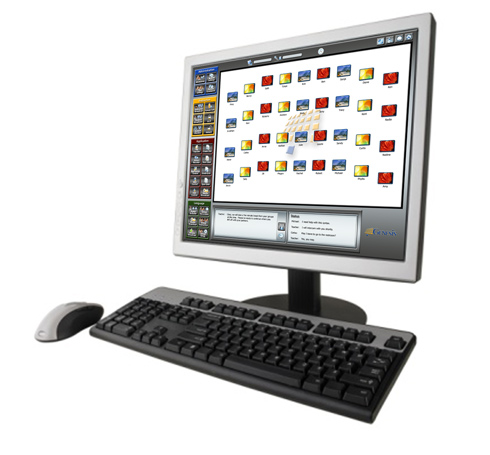
Genesis LC1 is a software-based language training system featuring the newest technologies available for multimedia interactivity. Running on standard Windows computers over your local area network, Genesis provides both instructors and students with the power and flexibility to enjoy high-tech learning the way it was meant to be.
Simply put, Genesis LC1 is a software application that runs on the instructor and student computers. The students and instructor communicate over a standard local area network, allowing for communication and interaction. With the use of headsets, students can communicate with their computers, their classmates and their instructor.
With Genesis LC1, complete control and efficient teaching are always a click away. Following are just a few of the system’s powerful features:
- Communicate with any student by clicking one button.
- Broadcast your screen and voice to individuals, groups or the entire class.
- Utilize the built-in smart board to highlight, draw, or type on student screens.
- Teach any subject or the use of any software program.
- Remotely turn on or off lab computers.
- Lock or Darken lab computers.
- Automatically or manually monitor all computers in your lab.
- View all student screens simultaneously as thumbnails.
- Launch Applications or the Internet on any student computer.
- Block Applications or the Internet on any student computer.
- Take control of any lab computer and teach while doing.
- Utilize the integrated digital recorder specifically designed for language learning.
- Save the students' recording work and listen to it later.
- Send any files to student computers.
- Automatically retrieve student files.
- Prepare quizzes or lessons for in-class work or homework using video, still pictures, graphics, text or audio files.
- Utilize in either a wired or wireless network.
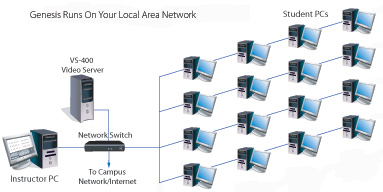
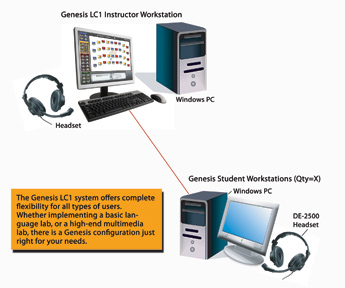
A typical Genesis LC1 language lab consists of an instructor’s workstation and several student workstations. The instructor’s workstation will consist simply of a computer, a desk and headset. The student workstations will also contain computers, desks, and headsets. Genesis offers unparalleled flexibility, allowing you to have the custom features you need in your unique environment.
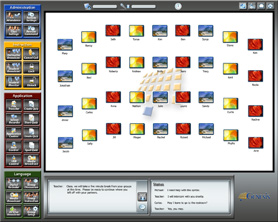
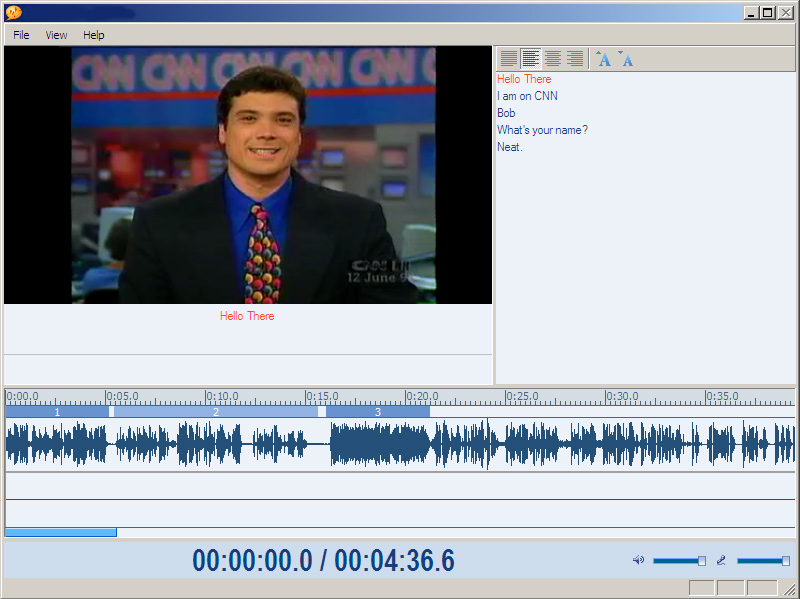
As a software-based language lab system, Genesis LC1 runs on Windows 10, 8, 7 and Vista and computers and communicates as a system over a local area network. This network may be either wired or wireless. High-bandwidth data communication such as screen broadcasts, video broadcasts, audio communication and student grouping function smoothly and efficiently. All Genesis functions operate in real-time. When an instructor clicks a button to broadcast a student’s screen to the rest of the class, all the students see that screen immediately and as clearly as if it were their own display. For additional in-depth information, visit the Instructor's View and Student's View pages. A portion of the instructor's interface is shown below.

Genesis LC1 System Requirements:
- Operating System: Windows 7, Vista, XP
- Computers:
- Pentium 4 / 800 MHz or Higher
- 4GB RAM
- HDD: 1.5GB of available hard disk space Instructor Software Module Size: 36MB
- 100 Mbps Network Interface Card or 54 Mbps Wireless Network Card
- Recommended display resolution: 1920x1080
- Full-Duplex / AC-97 or HD Audio Sound Card (*all system sound cards must match)
- 100Mbit Network Card with WOL
- 100/1000Mbit Network Switch or Buffalo WHR-HP-G54 Wireless AP
- Optional Accessories:
- Headset with Microphone
- Audio/Video Editing Workstation

The Instructor's Interface is your control panel for all Genesis system functions. Scroll down for detailed views. Please note that Genesis LC1 makes extensive use of "right-click" menus to access additional functions not shown here.
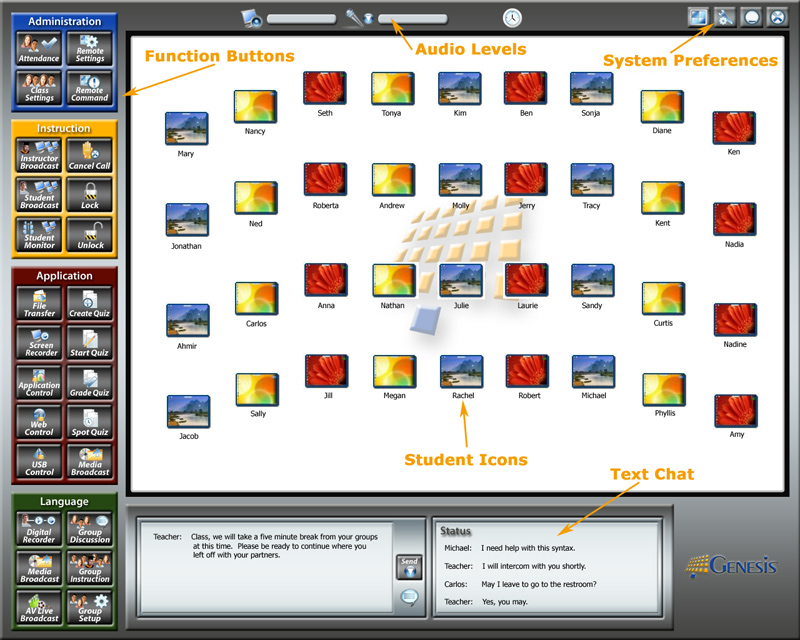
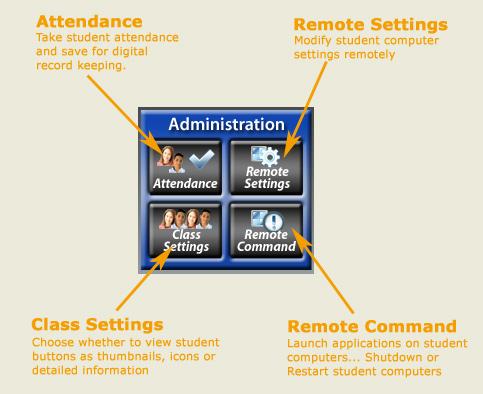
Instructor Interface - Close-ups:
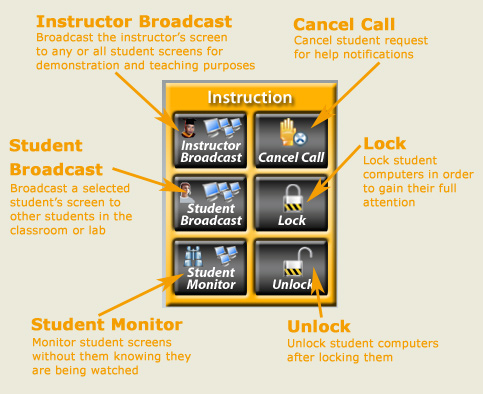
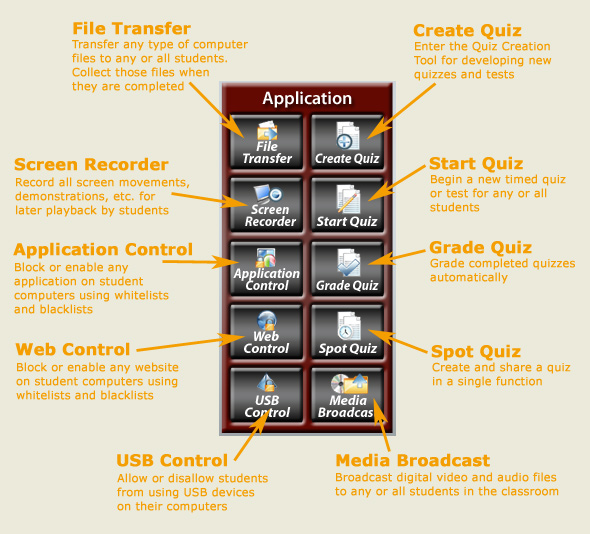
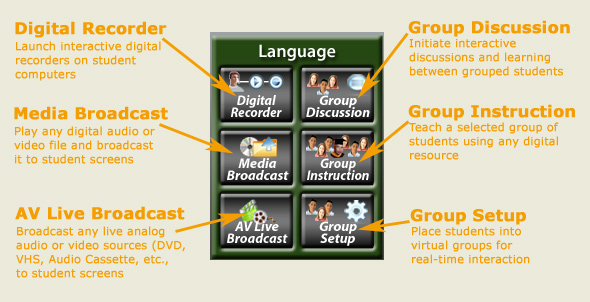
The Student's view of the Genesis LC2 system finds itself in three key interfaces, the Student Login Window, the Student Menu and the SpeechMate Digital Recorder. To access these features, the student simply clicks on the student icon located in the Windows Taskbar. Scroll down for detailed views.
Student Access Window and Student Menu - Close-ups:
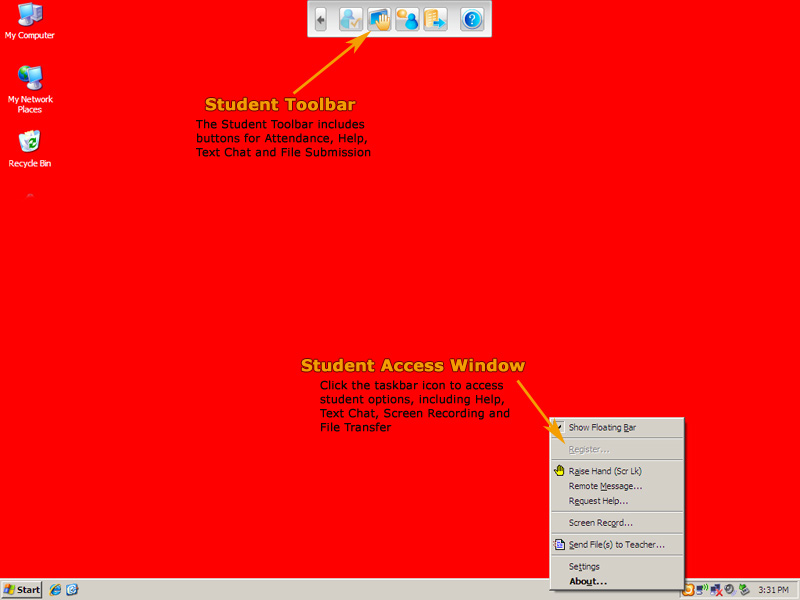
Digital Recorder - Close-up:



These short videos highlight different aspects of our company and our products.
GRANT IDEAS
Implementing a second language classroom or laboratory is a big commitment, and can require funding sources outside of normal budgets. The links below provide ideas and resources on how to write funding proposals and where to look for outside funding.
Writing Grant Proposals:
Philanthropy at Independent Schools, Third Edition
Fundraising Basics for Private School Facilities
Big-Time Fundraising for Today's Schools
Capital Financing for Private & Independent Schools
Finding Funding Sources:
US State Department English Language Teaching & Learning
The Japan Foundation Grants for Language
US Department of Education International Education Programs
US Department of Education Foreign Language Assistance Program
Edward Ford Foundation for Independent Schools
Foundation Center Local Funding Support
eSchool News Funding Resources
Verizon Foundation Grant Center
 INSTALLATION & TRAINING
When it is time to install your system in a language lab or second language classroom, Linguatronics has many options to meet your particular needs.
Linguatronics offers comprehensive, on-site installation services provided by trained technical staff. If you decide to install our system yourself, we offer online and telephone installation support to guide you through the process.
During our on-site installation visits, we dedicate a good portion of our time to training your technical staff and end-users on system functionality and usage. These training sessions are hands-on events, giving you valuable experience using the system in authentic situations.
If you decide to install your own system, we can make on-site training-only visits to train your staff. Alternatively and additionally, you can use our on-line training service for complete system training or to brush-up on certain skill areas. On-line training is available to registered users 24 hours a day, 7 days a week.
 ANNUAL MAINTENANCE
Keeping your Genesis system and accessories up-to-date is very important. Many Linguatronics customers enroll in annual or multi-year maintenance contracts in order to keep their systems completely updated. Computer technologies and operating systems change almost weekly. It is important to keep your valuable Genesis system in line with these constant changes.
Linguatronics is constantly adding features to our software at customer requests. In fact, most of our system's features have been suggested by great customers like you. We want to ensure all of our customers have the newest software versions, so that everyone can share in the latest functions and features.
Linguatronics can design a maintenance plan that is right for you and your organization. We will take into consideration your available technical staff, remote update possibilities and your standard upgrade procedures in creating your maintenance plan.
Please contact us to discuss your ongoing maintenance needs or to create a new plan for your organization.
Worldwide Language Training Systems Provider
"The sun never sets on Linguatronics installations."
Click to Watch an Introduction to Linguatronics.
Linguatronics has a worldwide dealer network.
To inquire about becoming a dealer, contact us here.